- DashboardDashboard
- Dashboard chartsDashboard Chart
- Gross profitGross Profit
- Profit and loss statementProfit and Loss Statement
- Cash flowCash Flow
- ProjectsProject
- Project updatesProject Update
- TasksTask
ONE ERP. EVERY PART OF YOUR BUSINESS.WION / INTEGRATED OPERATIONS
One system that keeps your business moving
Your business processes
connect as one.
Bring processes managed manually and in separate files into ERP.
Digitize everything from sales orders, production, and shipment to HR and management.
Give AI natural-language instructions for queries, reports, and data entry.
Processes configured for your companyIntegration with your existing accounting system
 ERPAn integrated environment connecting your operations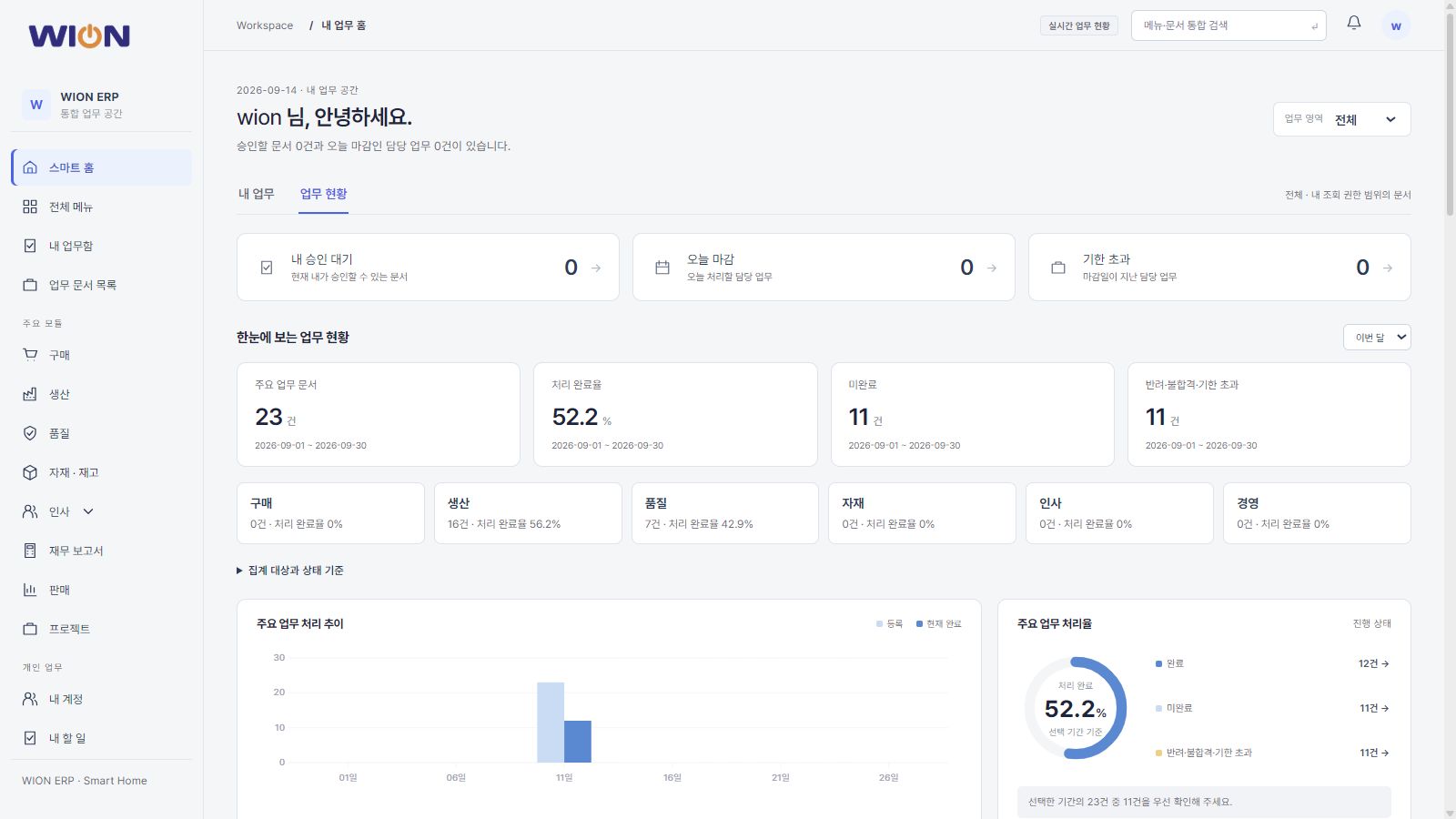
Management, sales & purchasingInventory, production & qualityHR, payroll & assets
Existing WION business screen (Korean interface) · Configured to your company's operating rules
From management to the shop floor, connected operations start here.EXPLORE THE ERP ↓
01 / INSIDE WION ERP
Connect your business with
core ERP modules.
Select a module to view its key features and workflow.
ERPConnect the processes your company needs, from management to the shop floor01 / MANAGEMENT
Management & dashboards
Dashboards & KPI · Projects · Tasks & progress
View details ↗02 / SALES / CRMSales & CRM
Leads & opportunities · Customers & contracts · Quotations & sales orders
View details ↗03 / PROCUREMENTPurchasing & procurement
Purchase requests · Quotation requests & comparison · Purchase orders
View details ↗04 / WMS / INVENTORYInventory & warehouses
Items & warehouses · Receipts, issues & transfers · Picking & shipment
View details ↗05 / MES / MANUFACTURINGProduction, shop floor & POP
BOM & processes · Production plans & material requirements · Work orders & job cards
View details ↗06 / QUALITYQuality
Inspection criteria & inspections · Nonconformances · Quality actions
View details ↗07 / HRM / PEOPLEHR
Employees & organization · Clock-ins, clock-outs & attendance · Leave requests & allocations
View details ↗08 / PAYROLLPayroll
Salary structures & assignments · Salary components & additional salary · Payroll processing & payslips
View details ↗09 / ASSET MANAGEMENTAssets
Assets, categories & locations · Asset transfers · Repairs & maintenance
View details ↗Shared operational foundationCompanies, organizations, business partners & itemsRole-based permissionsApproval proceduresDashboards & reports
02 / CONNECTED WORKFLOW
Bring separate manual processes together,
and digitize them in ERP.
From sales, purchasing, and production to warehouses and HR.
Handle each department's processes in ERP,
and review progress and results together.
DIGITAL OPERATIONS
From sales order to shipment
Connect sales, purchasing, production, and warehouse progress through a single order.
Select a step to view the processes handled in ERP and the responsible modules.STEP 01 / Sales & CRM
Sales & CRM Learn more ↗Customers & quotations
Organize customer requests, items, prices, and commercial terms.
These are representative business scenarios. Configure the actual processing steps and approval procedures to match your company's operations.
03 / ERP COMMON FUNCTIONS
Digitize processes on
a shared operational foundation.
Configure permissions, approvals, and status views
to match your company's business rules.
Processing & approvals
Configure screens, fields, and approval stages to match your company's procedures and handle them in ERP.
Permissions & dashboards
Set viewing, data entry, and approval permissions by owner, and review business progress and management status in one place.
AI queries, reports & data entry
Query business data and create custom reports in natural language. Give AI instructions to handle form entry and registration for you.
AI business assistant
Ask questions to retrieve information and give instructions to complete tasks.
From using data already in ERP to entering new business records.
Request tasks in natural language and follow up to review the results.
- 01Request in natural language
- 02Confirm the target & conditions
- 03Query, report & enter data
- 04Review results & follow up
Data queries
Ask for the results you need without navigating through menus.
Specify the period, department, customer, item, or other criteria to query business data recorded in ERP. After reviewing the results, change the conditions or ask again using different criteria.
- Search business data & filter results
- Check progress & performance
- Refine queries with follow-up questions
Usage examples
- Request
- “Show only unshipped orders from this month's sales orders by customer”
- Result
- Review sales orders and unshipped quantities by customer
- Follow-up request
- “Now show only the orders whose delivery dates have passed”
Custom reports
Specify the criteria and fields you need in your report.
Request the period, comparison criteria, and fields you want to see without being limited to a preset view. Consolidate and compare ERP data in a report tailored to your purpose.
- Consolidate by period, department & item
- Compare plans with actuals & compare periods
- Build reports with the fields you need
Usage examples
- Request
- “Compare this month's planned and actual production by operation, and report the items with large differences”
- Result
- Compare planned and actual production by operation and summarize differences
- Follow-up request
- “Also compare last month's results using the same criteria”
Data entry & registration
Tell AI what to register, and it fills in the form for you.
Go beyond queries. Provide the information and the target process, and AI fills in the appropriate ERP fields and registers the record. Use it for sales orders, purchase requests, work orders, and other relevant processes.
- Apply task instructions to form fields
- Use document contents to create ERP records
- Review registered results after processing
Usage examples
- Request
- “Create a sales order from this quotation for Customer A, with delivery on the 10th of next month”
- Result
- Create a sales order with the customer, items, quantities, and delivery date
- Follow-up request
- “Show the items and delivery date of the sales order you created”
Viewing and data entry permissions and approval procedures follow your company's operating rules. Define the tasks and data AI can handle during ERP implementation.
04 / BUILT AROUND YOUR BUSINESS
We understand your processes,
and build around your operations.
Define the modules and integration scope you need,
and validate them through real business scenarios.
- 01
Process analysis
Review current processes, documents, pain points, and implementation scope.
- 02
Configuration & development
Configure master data, modules, permissions, approvals, and integration methods.
- 03
Migration & validation
Prepare existing data and validate actual workflows.
- 04
Training & operations
Continue improving through role-specific training and operational reviews.
05 / LET’S TALK ABOUT YOUR BUSINESS
Which processes would you
like to connect?
Tell us which business areas you need and which systems you currently use.
Together, we'll define the right ERP setup for the client company.
01 Priority business areas+
Define the required scope across management, sales, purchasing, inventory, production, quality, HR, payroll, and assets, and review how each is handled today.
02 Existing systems & data+
Review your current accounting system, master data, records to migrate, integration targets, and data.
03 Operating procedures for your company+
Define approval stages, production and quality management fields, user permissions, and reporting rules.